
psst — this is Otto. he runs things while you live.

Your personal operating system.

Work, home, the side project. Otto gives each part of your life its own space on your Mac, with its own memory and its own agents, and keeps it all running quietly in the background.

Download for Mac
Free · Open source · macOS 15+
then, once, in Terminal: until Apple notarises us
$xattr -dr com.apple.quarantine /Applications/Otto.app

Otto, a small round navy character with two big eyes, waving hello
hi! I keep an eye on things.
(two, actually)
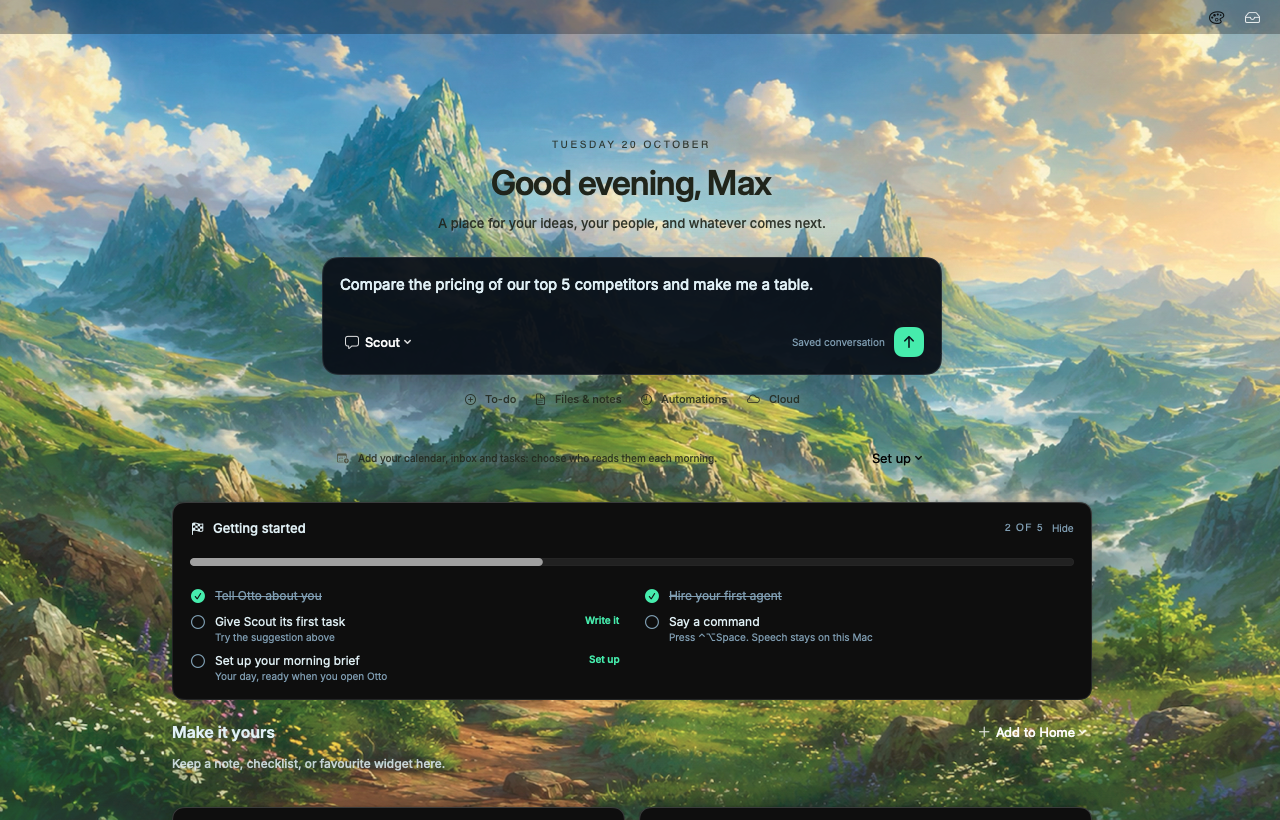
Home · where every day starts
Otto Home: a greeting, a task ready to send to Scout, and a Getting started checklist over the Highfell valley

Your life isn’t one thing. There’s work, there’s family, and there’s the project you build at night. Otto gives each of them its own space on your Mac, with its own memory and its own AI helpers.

— everything in its place, and looked after.
see it work

The whole tour, start to finish.

filmed on the Mac it runs on ↓

I built my own AI personal OS8 min · Max Mitcham · YouTube
spaces

One Mac. Every part of you.

A space is a whole separate place: its own memory, agents, chats, files, automations and even its own look. Switch with one click from the top of Home. Nothing leaks from one to another unless you let it.

Space one

Work

  • Remembers your clients, your tone, last week’s decisions
  • Agents Scout researching, Iris on the inbox
  • Morning meetings, replies you owe, what shipped
Space two

Personal

  • Remembers the kids’ timetable, the trip, the boiler man
  • Agents one planning the holiday, one on the admin
  • Morning the school run, renewals, birthdays coming up
Space three

Side project

  • Remembers the idea, the plan, what you tried
  • Agents Forge building at night, Quill on the launch post
  • Morning what got done while you slept

your work agents never see your family’s calendar. promise.

a day with otto

It runs while you live.

An operating system works in the background so you don’t have to think about it. So does Otto, and he’ll tell you how he’s doing.
  1. Otto hurrying along with an orange folder

    Your brief is written. Each space’s agents read your calendar, inbox and tasks before you wake.

    busy, quietly

  2. Otto waving

    You open Home. Three meetings, two replies you owe, and the table Scout finished overnight.

    good morning!
  3. Otto thinking, a hand on his chin

    Something needs you. Iris drafted a reply to Jo. Otto asks once, in one place, and waits.

    one quick question…
  4. Otto asleep

    You switch to Personal and close the lid. Work stays where it belongs until morning.

    work can wait. zzz
why “operating system”

The computer, rethought.

Your Mac organises files and apps. Otto organises the work itself, and the people (agents) doing it.

Desktop
Home. Your day, your cards, and one box to ask anything.
User accounts
Spaces. Work, Personal, whatever you need, kept apart.
Apps
Agents. Hire a bot for a job, start a session for a task, put a team in a room.
Your files
Memory. What you’ve told it and what it has learnt, shared with every agent in the space.
Background tasks
Automations. Plain-words schedules that run without you.
Notifications
Needs you. Only decisions. Never noise.
Documents
Docs, sheets, slides and dashboards your agents write and keep current.

Local by default.

Your work, files and history stay on this Mac unless you choose a cloud service.

Your AI, your accounts.

Runs on the Claude and Codex subscriptions you already have, and switches when one hits its limit.

Never paste a key.

Apps connect by signing in through your browser. Nothing secret goes into a chat.

Open source.

Every line is on GitHub. Read it, build it yourself, or help make it better.

works with

The agents you already trust.

changelog

Recently shipped.

every release →
go on, he doesn’t bite

Give your life somewhere to live.

Download for Mac
Free · Open source · macOS 15+
then, once, in Terminal: until Apple notarises us
$xattr -dr com.apple.quarantine /Applications/Otto.app